Host-to-Host API
Build your own checkout
Pure REST primitives + HMAC-signed webhooks. Bring your own frontend, render your own payment flow, control every part of the experience. Same Paymos backend, full control over the surface.
How it works
Three calls. Your UI in the middle
Create the invoice from your backend, render the payment surface yourself, receive a signed event when the payment confirms. The boundary stays clean.
- 1
Create the invoice
POST to /v1/invoices from your backend. Pass the amount, the currency, your own external order ID. Get back the invoice ID and its payment URL.
- 2
Render your own UI
Collect the token and network on your side and confirm them from your server — the call returns the deposit address. Show it, the QR, the timer, however your product looks.
- 3
Receive the signed webhook
Paymos POSTs an HMAC-signed event to your endpoint when the payment confirms. Verify the signature, mark the order paid, return 200.

Try every call before you ship
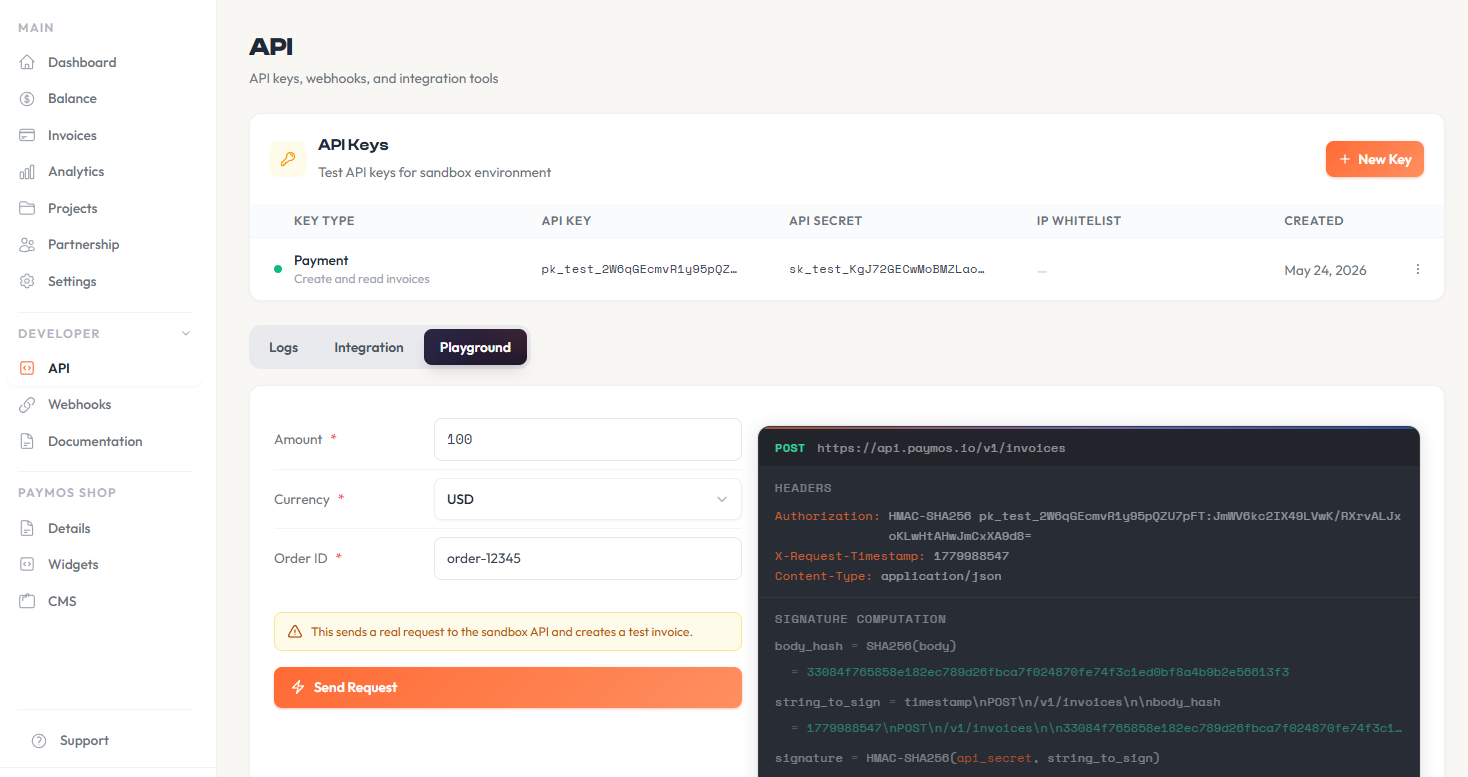
The dashboard Playground fires real sandbox requests with your test API key. Pick the endpoint, fill the params, hit Send — see the live HMAC signature, the headers, the response. No Postman, no curl, no copy-paste from the docs.
Interface control
When the hosted page isn't enough
For teams that build their own payment form over the API — pixel-perfect to their brand and wired into their own systems. Host-to-host is what you reach for when no ready-made surface fits.
Full surface control
Render the wallet picker, the QR, the status updates yourself. Your design system, your interaction language, your brand.

Native to any stack
Node, Python, PHP, Go, Ruby, Java, .NET — anything that speaks HTTP works. No SDK lock-in.

Signed webhooks with retries
HMAC-signed payloads, at-least-once delivery, exponential backoff retries. Verify on your side, deduplicate on your side.
Sandbox environment
Test mode lives next to production. Same endpoints, isolated data, no real money moves.
What you control
You render the UI. We watch the chain
The boundary is clear: your frontend handles every pixel the customer sees. Our infrastructure handles wallet derivation, chain monitoring, confirmation depth, and settlement.
Your UI
Wallet picker, network picker, address display, QR generation, status feedback — all yours to design.
Your flow
Sequence the steps however your product needs. Bundle checkout into onboarding, split it across screens, gate it behind authentication.
Your brand
Paymos never appears in the customer's URL or visual frame. The payment surface is fully white-labelled.
Your settlement
Withdraw to your treasury wallet on your schedule. Same balance ledger every other Paymos surface settles into.
Get started
Same backend, no SDK to learn
Create an invoice via REST, poll for status changes or subscribe to webhooks, render whatever UI fits. Eight official server SDKs, identical signature scheme across endpoints.
Read docsimport { Paymos, externalOrderId } from '@paymos/sdk';
const paymos = new Paymos({
apiKey: process.env.PAYMOS_API_KEY,
apiSecret: process.env.PAYMOS_API_SECRET,
});
const invoice = await paymos.invoices.create({
projectId: 'prj_xxxxxxxxxxxx',
amount: '100.00',
currency: 'USD',
externalOrderId: externalOrderId('order'),
clientId: 'customer-456',
});
console.log(invoice.invoiceId, invoice.paymentUrl);import os
from paymos import Paymos
paymos = Paymos(
api_key=os.environ["PAYMOS_API_KEY"],
api_secret=os.environ["PAYMOS_API_SECRET"],
)
invoice = paymos.invoices.create(
project_id="prj_xxxxxxxxxxxx",
amount="100.00",
currency="USD",
external_order_id="order-123",
client_id="customer-456",
)
print(invoice["invoice_id"], invoice["payment_url"])<?php
use Paymos\Client;
use Paymos\ClientConfig;
use Paymos\IdempotencyKey;
$paymos = new Client(new ClientConfig(
getenv('PAYMOS_API_KEY'),
getenv('PAYMOS_API_SECRET')
));
$invoice = $paymos->invoices()->create(array(
'project_id' => 'prj_xxxxxxxxxxxx',
'amount' => '100.00',
'currency' => 'USD',
'external_order_id' => IdempotencyKey::externalOrderId('order'),
'client_id' => 'customer-456',
));
echo $invoice['invoice_id'] . ' ' . $invoice['payment_url'];package main
import (
"context"
"fmt"
"os"
paymos "github.com/Paymos-labs/go-sdk/v2"
)
func main() {
client, err := paymos.NewClient(os.Getenv("PAYMOS_API_KEY"), os.Getenv("PAYMOS_API_SECRET"))
if err != nil {
panic(err)
}
invoice, err := client.Invoices.Create(context.Background(), paymos.CreateInvoiceParams{
ProjectID: "prj_xxxxxxxxxxxx",
Amount: "100.00",
Currency: "USD",
ExternalOrderID: "order-123",
ClientID: stringPointer("customer-456"),
})
if err != nil {
panic(err)
}
fmt.Println(invoice.InvoiceID, invoice.PaymentURL)
}
func stringPointer(value string) *string { return &value }using Paymos;
using var paymos = new PaymosClient(
Environment.GetEnvironmentVariable("PAYMOS_API_KEY")!,
Environment.GetEnvironmentVariable("PAYMOS_API_SECRET")!);
var invoice = await paymos.Invoices.CreateAsync(new CreateInvoiceRequest(
ProjectId: "prj_xxxxxxxxxxxx",
Amount: "100.00",
Currency: "USD",
ExternalOrderId: "order-123",
ClientId: "customer-456"));
Console.WriteLine($"{invoice.InvoiceId} {invoice.PaymentUrl}");import io.paymos.CreateInvoiceRequest;
import io.paymos.Invoice;
import io.paymos.PaymosClient;
PaymosClient paymos = new PaymosClient(
System.getenv("PAYMOS_API_KEY"),
System.getenv("PAYMOS_API_SECRET"));
Invoice invoice = paymos.invoices.create(
CreateInvoiceRequest.builder()
.projectId("prj_xxxxxxxxxxxx")
.amount("100.00")
.currency("USD")
.externalOrderId("order-123")
.clientId("customer-456")
.build());
System.out.println(invoice.invoiceId() + " " + invoice.paymentUrl());require 'paymos'
paymos = Paymos::Client.new(
api_key: ENV.fetch('PAYMOS_API_KEY'),
api_secret: ENV.fetch('PAYMOS_API_SECRET')
)
invoice = paymos.invoices.create(
project_id: 'prj_xxxxxxxxxxxx',
amount: '100.00',
currency: 'USD',
external_order_id: 'order-123',
client_id: 'customer-456'
)
puts "#{invoice.invoice_id} #{invoice.payment_url}"use paymos::{CreateInvoiceRequest, PaymosClient};
let paymos = PaymosClient::new(
std::env::var("PAYMOS_API_KEY")?,
std::env::var("PAYMOS_API_SECRET")?,
)?;
let invoice = paymos
.invoices()
.create(&CreateInvoiceRequest {
project_id: "prj_xxxxxxxxxxxx".to_owned(),
amount: "100.00".to_owned(),
currency: "USD".to_owned(),
external_order_id: "order-123".to_owned(),
network: None,
allow_multiple_payments: None,
customer_fee_percent: None,
client_id: Some("customer-456".to_owned()),
})
.await?;
println!("{} {}", invoice.invoice_id, invoice.payment_url);One signing scheme
HMAC-SHA256 with a shared secret. Same scheme for invoice creation, status polling, withdrawal, webhook verification — one auth pipeline to maintain.
Platform integration
Multi-project accounts, scoped API keys, idempotent invoice creation via external_order_id. Build the checkout your own way — the API stays the same.
Who uses Host-to-Host
For products with a dedicated payment interface
Anywhere the hosted UI is too constrained — and the business has the engineering team to build their own. Crypto exchanges, custodial wallets, trading platforms, on-ramps.
Crypto exchanges
Run deposits as a native experience inside your trading UI, not as a redirect to a third party.
Custodial wallets
Top-up flows that live entirely inside your wallet app. No browser handoff, no out-of-process step.
Trading platforms
Margin top-ups, deposit reconciliation, multi-account settlement — all driven by the same REST primitives.
Platforms with their own frontend
Product teams that would rather build the payment screen than embed one. Addresses, confirmation state and signed events come from the API; what the user actually looks at is written by your own code.
Pricing
1.0% per settled invoice, 0.3% on Enterprise
The same two numbers as every other Paymos surface. Enterprise is asked for directly, and the founder answers.
See pricing