Skip to content

Stablecoin payments

Crypto payment gateway for global businesses

Accept the assets your customers already hold — USDT, USDC and other dollar-pegged tokens across 13 networks. Go from sign-up to a first real mainnet payment in about 10 minutes.
KYC docs
0
consolidation fees
$0
conversion loss
0%
hidden fees
0

Why Paymos

Everything to run crypto payments. Nothing you don't need

From invoice to wallet — one platform for acceptance, custody, balances, and payouts. Built for engineers and finance.

Everything in one rate

Incoming network gas is covered. No conversion loss, no separate fee to move your funds.

Withdrawals when you want

Request a payout and the transaction is signed and sent straight away — no approval queue, no batch window, no lock-in.

Pay on theirs, get paid on yours

Customers pay on the network they already use; you get paid on the one you choose.

Nothing to stitch together

Payments, payouts, balances and reporting in one place, behind one integration.

Live without the paperwork

Start without upfront KYC or business documents. Going live is your own decision, and no one signs off on it.

A test mode that doesn't lie

Sandbox uses the same API contract with separate test credentials, so the integration shape stays consistent when you move to Production.

Who it's for

Commerce & Retail

Card declines kill 5-15% of carts. Chargebacks eat margin. International orders flag as fraud. Crypto closes all three at once.

Learn more— Commerce & Retail

SaaS & Digital Products

Stripe blocks AI APIs, prop tools, and 50+ countries. Recurring billing breaks on expired cards. Stablecoins keep paying customers paying.

Learn more— SaaS & Digital Products

Creators & Media

Patreon's standard plan takes 10%, plus card processing. One policy review can stop payouts mid-cycle. A stablecoin payment clears to your balance with no content review in the path.

Learn more— Creators & Media

Services & Hosting

VPN, RDP, hosting trip card MCC blocks. Agency clients pay $5K-$50K invoices — cards cap, wires cost 6%. Stablecoins move both.

Learn more— Services & Hosting

Travel & Hospitality

Cross-border bookings flag at 4-8x normal fraud rate. Refund pipelines lock funds for 7-14 days. Stablecoin payments clear and stay cleared.

Learn more— Travel & Hospitality

iGaming & Betting

MCC 7995 = automatic acquirer refusal. Visa caps chargeback ratio at 0.9% before fines. Stablecoins have neither limit nor MCC.

Learn more— iGaming & Betting

Donations & Non-profits

Religious and political orgs lose card processing mid-campaign. PayPal Giving Fund grants once a month, 15 to 45 days after the donation. A stablecoin donation lands on your balance and leaves when you send it — not on a payout calendar.

Learn more— Donations & Non-profits

Products

Where your customer pays

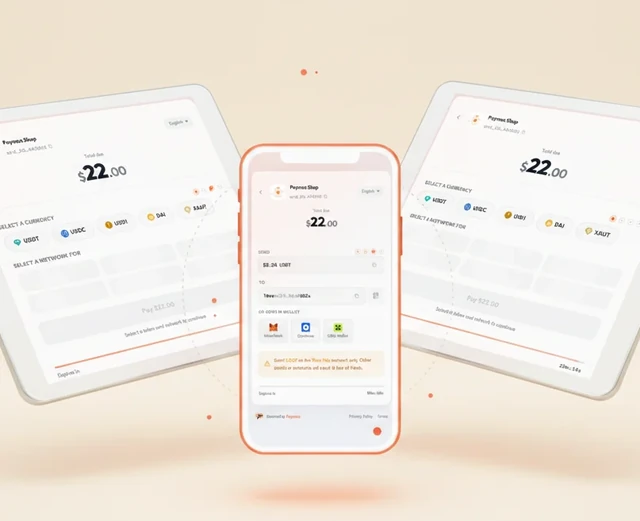
Share a link, keep checkout on your own page, take payment at the counter or inside a chat — or give a customer an address that never changes.

01 / 05

Hosted checkout

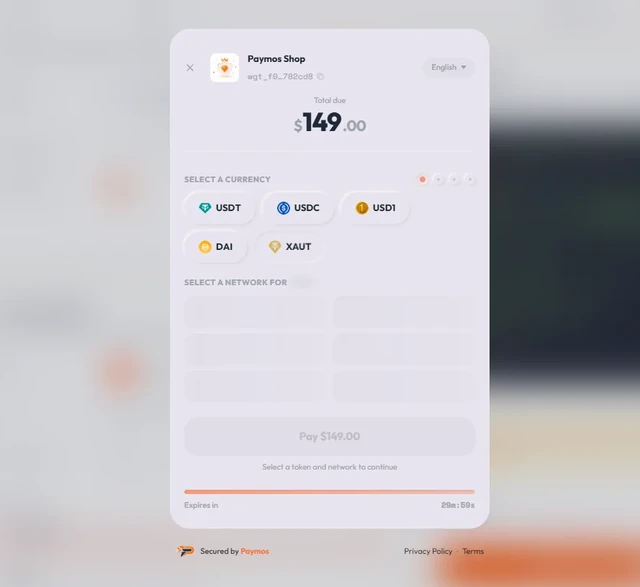
A ready-made payment page, hosted and run by Paymos. Your customer pays there — you build and host nothing.

  • Branded with your logo and accent colour
  • Reach it any way — a shared link, a button, or your API
  • Mobile-ready out of the box, and we keep it maintained
Learn more— Hosted checkout
Hosted checkout
02 / 05

Embedded checkout

Customers pay without ever leaving your site.

  • Opens in a modal overlay
  • Drops in with two lines of HTML
  • Works on any page — product, cart or pricing
Learn more— Embedded checkout
Embedded checkout
03 / 05

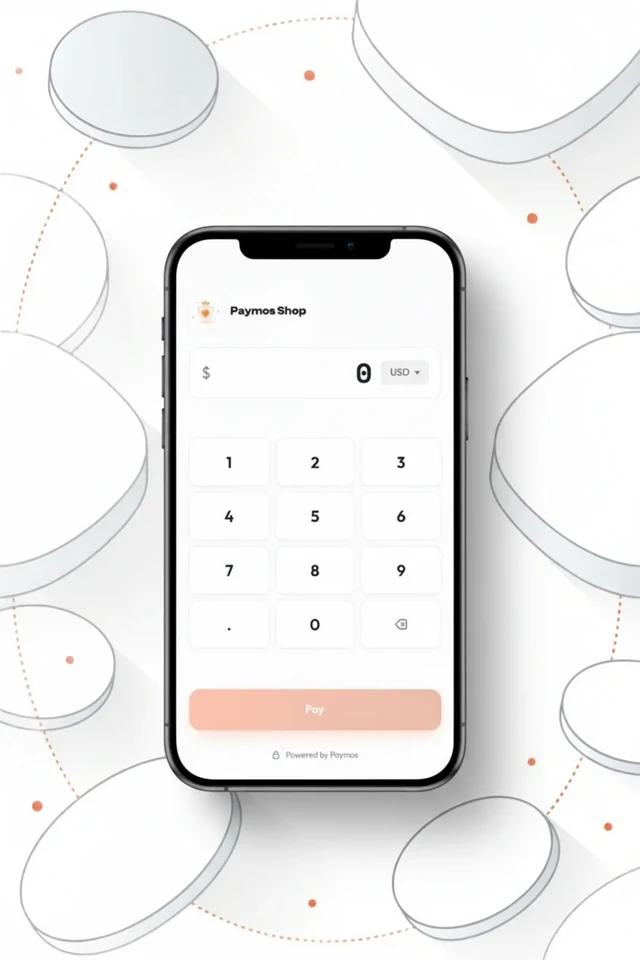
Terminal POS

In-person QR payment. Cashier enters the amount on phone or tablet.

  • Phone or tablet becomes a crypto terminal
  • Cashier types the amount — customer scans QR
  • No card reader, no hardware to maintain
Learn more— Terminal POS
Terminal POS
04 / 05

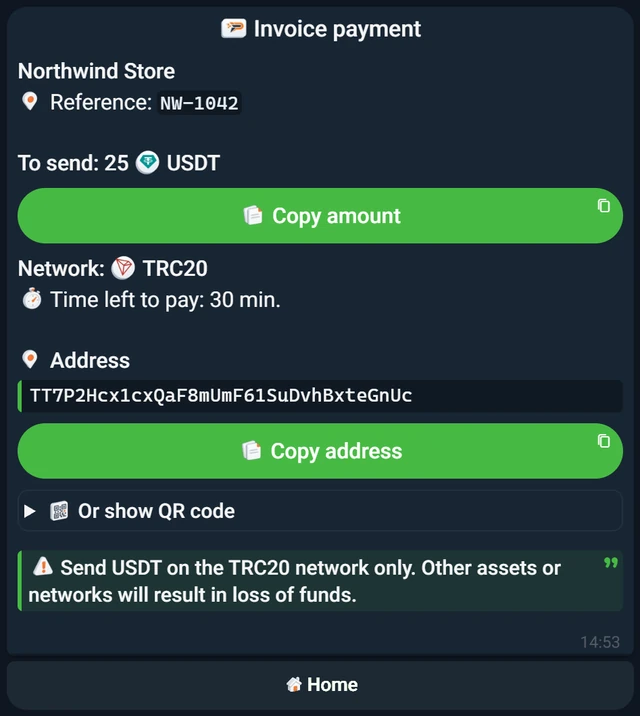
Telegram checkout

A Telegram-bot project has no payment page — its invoice link opens the Paymos bot. The customer stays in the app they were already in.

  • No website anywhere in the flow
  • Your customer needs no Paymos account
  • The status moves in the chat, not on a tab kept open
Learn more— Telegram checkout
Telegram checkout
05 / 05

Payment channels

A permanent deposit address that belongs to one customer. No amount, no expiry — every transfer that arrives is credited to your balance.

  • One address per network, held for the life of the channel
  • Tied to the customer ID you already use
  • Block it without losing the channel or its history
Learn more— Payment channels
Payment channels

Pricing

1.0% flat. 0.3% at scale

One number on your invoice. We cover the network gas on the way in — no conversion loss, no commission when you move your funds out, nothing stacked on top.

See full pricing

Integration

Four ways to connect

REST API for full control, Low-Code SDK for embedded forms, payment links for no code at all, CMS plugins for drop-in install.

REST API

HMAC-signed JSON for invoices, withdrawals, balances and webhooks, with eight official server SDKs.

Learn more— REST API

Low-Code SDK

JavaScript one-liner. Checkout, donation and terminal modes. Embed on any site.

Learn more— Low-Code SDK

Payment Links

No code and no site needed. Create a link, send it in a chat or an invoice, get paid.

Learn more— Payment Links
import { Paymos, externalOrderId } from '@paymos/sdk';

const paymos = new Paymos({
  apiKey: process.env.PAYMOS_API_KEY,
  apiSecret: process.env.PAYMOS_API_SECRET,
});

const invoice = await paymos.invoices.create({
  projectId: 'prj_xxxxxxxxxxxx',
  amount: '100.00',
  currency: 'USD',
  externalOrderId: externalOrderId('order'),
  clientId: 'customer-456',
});

console.log(invoice.invoiceId, invoice.paymentUrl);
import os

from paymos import Paymos

paymos = Paymos(
    api_key=os.environ["PAYMOS_API_KEY"],
    api_secret=os.environ["PAYMOS_API_SECRET"],
)
invoice = paymos.invoices.create(
    project_id="prj_xxxxxxxxxxxx",
    amount="100.00",
    currency="USD",
    external_order_id="order-123",
    client_id="customer-456",
)

print(invoice["invoice_id"], invoice["payment_url"])
<?php
use Paymos\Client;
use Paymos\ClientConfig;
use Paymos\IdempotencyKey;

$paymos = new Client(new ClientConfig(
    getenv('PAYMOS_API_KEY'),
    getenv('PAYMOS_API_SECRET')
));
$invoice = $paymos->invoices()->create(array(
    'project_id' => 'prj_xxxxxxxxxxxx',
    'amount' => '100.00',
    'currency' => 'USD',
    'external_order_id' => IdempotencyKey::externalOrderId('order'),
    'client_id' => 'customer-456',
));

echo $invoice['invoice_id'] . ' ' . $invoice['payment_url'];
package main

import (
	"context"
	"fmt"
	"os"

	paymos "github.com/Paymos-labs/go-sdk/v2"
)

func main() {
	client, err := paymos.NewClient(os.Getenv("PAYMOS_API_KEY"), os.Getenv("PAYMOS_API_SECRET"))
	if err != nil {
		panic(err)
	}
	invoice, err := client.Invoices.Create(context.Background(), paymos.CreateInvoiceParams{
		ProjectID:       "prj_xxxxxxxxxxxx",
		Amount:          "100.00",
		Currency:        "USD",
		ExternalOrderID: "order-123",
		ClientID:        stringPointer("customer-456"),
	})
	if err != nil {
		panic(err)
	}
	fmt.Println(invoice.InvoiceID, invoice.PaymentURL)
}

func stringPointer(value string) *string { return &value }
using Paymos;

using var paymos = new PaymosClient(
    Environment.GetEnvironmentVariable("PAYMOS_API_KEY")!,
    Environment.GetEnvironmentVariable("PAYMOS_API_SECRET")!);

var invoice = await paymos.Invoices.CreateAsync(new CreateInvoiceRequest(
    ProjectId: "prj_xxxxxxxxxxxx",
    Amount: "100.00",
    Currency: "USD",
    ExternalOrderId: "order-123",
    ClientId: "customer-456"));

Console.WriteLine($"{invoice.InvoiceId} {invoice.PaymentUrl}");
import io.paymos.CreateInvoiceRequest;
import io.paymos.Invoice;
import io.paymos.PaymosClient;

PaymosClient paymos = new PaymosClient(
    System.getenv("PAYMOS_API_KEY"),
    System.getenv("PAYMOS_API_SECRET"));

Invoice invoice = paymos.invoices.create(
    CreateInvoiceRequest.builder()
        .projectId("prj_xxxxxxxxxxxx")
        .amount("100.00")
        .currency("USD")
        .externalOrderId("order-123")
        .clientId("customer-456")
        .build());

System.out.println(invoice.invoiceId() + " " + invoice.paymentUrl());
require 'paymos'

paymos = Paymos::Client.new(
  api_key: ENV.fetch('PAYMOS_API_KEY'),
  api_secret: ENV.fetch('PAYMOS_API_SECRET')
)
invoice = paymos.invoices.create(
  project_id: 'prj_xxxxxxxxxxxx',
  amount: '100.00',
  currency: 'USD',
  external_order_id: 'order-123',
  client_id: 'customer-456'
)

puts "#{invoice.invoice_id} #{invoice.payment_url}"
use paymos::{CreateInvoiceRequest, PaymosClient};

let paymos = PaymosClient::new(
    std::env::var("PAYMOS_API_KEY")?,
    std::env::var("PAYMOS_API_SECRET")?,
)?;
let invoice = paymos
    .invoices()
    .create(&CreateInvoiceRequest {
        project_id: "prj_xxxxxxxxxxxx".to_owned(),
        amount: "100.00".to_owned(),
        currency: "USD".to_owned(),
        external_order_id: "order-123".to_owned(),
        network: None,
        allow_multiple_payments: None,
        customer_fee_percent: None,
        client_id: Some("customer-456".to_owned()),
    })
    .await?;

println!("{} {}", invoice.invoice_id, invoice.payment_url);

CMS Plugins

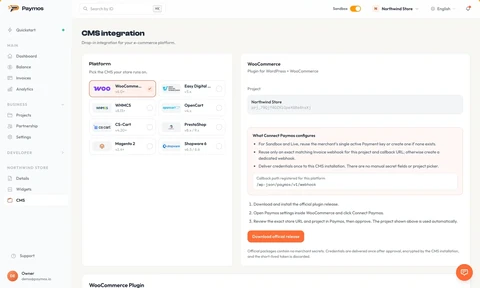
Eight official plugins for WooCommerce, WHMCS, OpenCart, Easy Digital Downloads, CS-Cart, PrestaShop, Magento 2 and Shopware 6.

Learn more— CMS Plugins

The dashboard

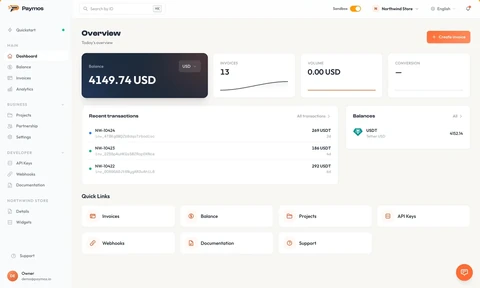
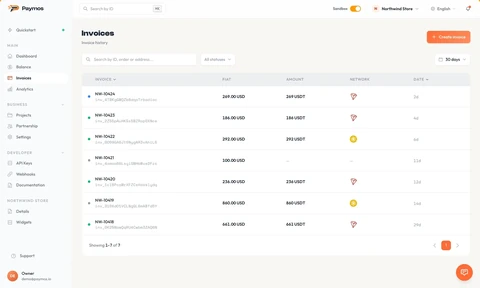
Every payment, in one place

Overview

Balance, invoices and volume for the period on one screen.

Overview
Invoices
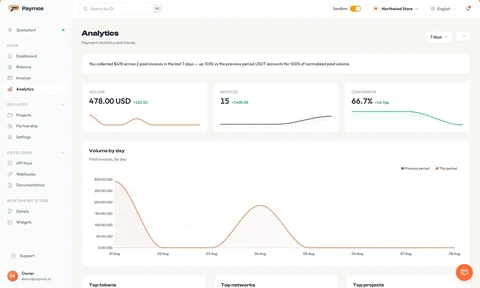
Analytics
CMS
Widgets
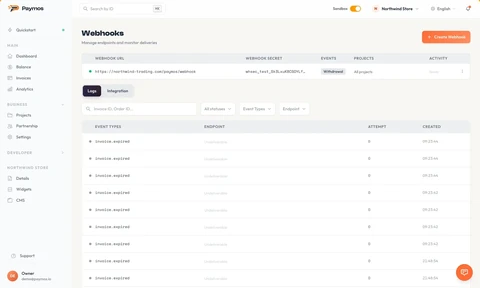
Webhooks

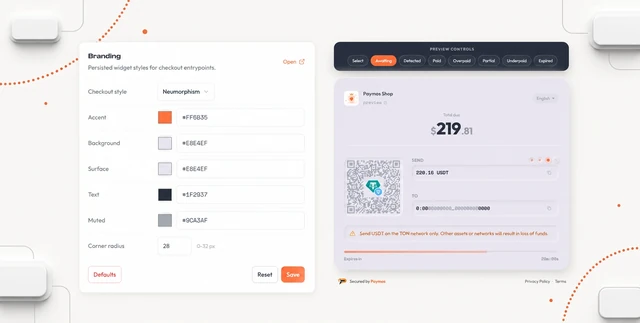
Branding

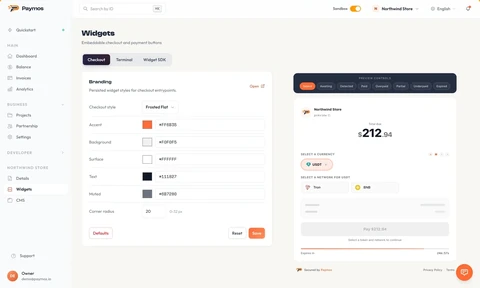
Restyle the checkout without touching code

Logo, accent colour, surface, text, muted tone, corner radius — all live in the project's branding settings. The page reads them as it loads. Change a colour in the dashboard, every embedded checkout updates. No redeploy, no code change.

See branding controls
Restyle the checkout without touching code

FAQ

FAQ

What does Paymos actually do?

Paymos sits between your customer's wallet and your balance. The customer pays in a supported asset, the amount is credited per token in managed custody, and you withdraw to a whitelisted wallet on demand. One API and one dashboard cover hosted checkout, embedded widget, and POS. The 1.0% is all-in — incoming network gas included, no per-call fees, no monthly minimums.

Which stablecoins and chains are supported?

Paymos accepts four dollar stablecoins — USDT, USDC, USD1, and DAI — plus gold-backed XAUT across 13 blockchain networks. USDT is available on 11 supported networks and USDC on 10; availability for each asset follows its official issuance.

How fast do payments confirm?

That depends on the network, and on some networks on the amount. BSC, Polygon, Solana, and TON confirm at network finality, whatever the invoice is worth. Ethereum, Tron, Arbitrum, Optimism, and Base go deeper as the amount grows — seconds on a small ticket, a few minutes on a large one. The buyer watches a live progress bar, and the webhook fires the moment the invoice is marked paid.

Do I need KYC to start accepting payments?

No upfront KYC or business documents are required. Go from sign-up to a first real mainnet payment in about 10 minutes, without manual Production activation.

How do withdrawals work?

One click in the dashboard or one API call. The transaction is sent as soon as the request lands — no batch days, no payout schedule, no approval queue — to your whitelisted address on the network you choose. How long it then takes to arrive is the payout network's own speed under current chain conditions. Paymos takes no commission on the withdrawal: what stays is the network fee for the route, and you pay less of it than the chain charges for that transfer. The exact amount is shown for the payout route you pick before you confirm. If a payout route is unavailable for a while, you see that at the form rather than after submitting, and your balance is untouched. A payout that fails or that you cancel comes back whole — amount and network fee together, because a transfer that never left costs nothing.

Is there a sandbox / test mode?

Yes. Sandbox uses the same API contract with separate test credentials and simulated payment and withdrawal outcomes. Switch to Production, create live credentials, and use them immediately — the environment switch does not create keys automatically.

What happens if a customer overpays, underpays, or pays from the wrong chain?

Overpayment is credited in full and the invoice closes as paid. For underpayment you set a tolerance per project: a payment that lands within it still completes as paid; beyond it the invoice is marked underpaid, and on a multi-payment invoice it stays open for the buyer to send the rest. To return funds you make a manual transfer from your balance — stablecoins are irreversible, so there is no chargeback either way. A payment must arrive in a supported token on a supported network; a transfer sent anywhere else is not credited to the invoice and cannot be recovered.

Are funds custodial? Who actually holds them?

Yes — the funds sit in Paymos custody. Your balance is a single amount per token, and withdrawals are signed on isolated infrastructure to merchant-controlled, whitelisted addresses. The balance stays there until you withdraw it, and a withdrawal you request waits for no payout run — no held-back reserve, no fixed schedule.

Can I use Paymos for high-risk verticals like iGaming, adult, forex prop?

Yes. A blockchain payment reaches no acquirer and carries no Visa or Mastercard MCC, so verticals that get auto-refused by card acquirers (gambling 7995, adult 5967, nutra, CBD, forex prop firms) work normally. The sanctions rules of the country you operate in still apply to you.

Ready to start accepting crypto?

The same API contract in Sandbox and Production. About 10 minutes from sign-up to a first real mainnet payment, with no manual activation gate.