Skip to content

AI Agents & MCP

Connect your coding agent straight to Paymos

Install an official Paymos plugin from GitHub or run @paymos/mcp with no API keys to copy. Your editor gets 27 docs pages and 3 local tools offline right away, then browser OAuth 2.1 unlocks 188 Sandbox and workspace tools under your own team role.

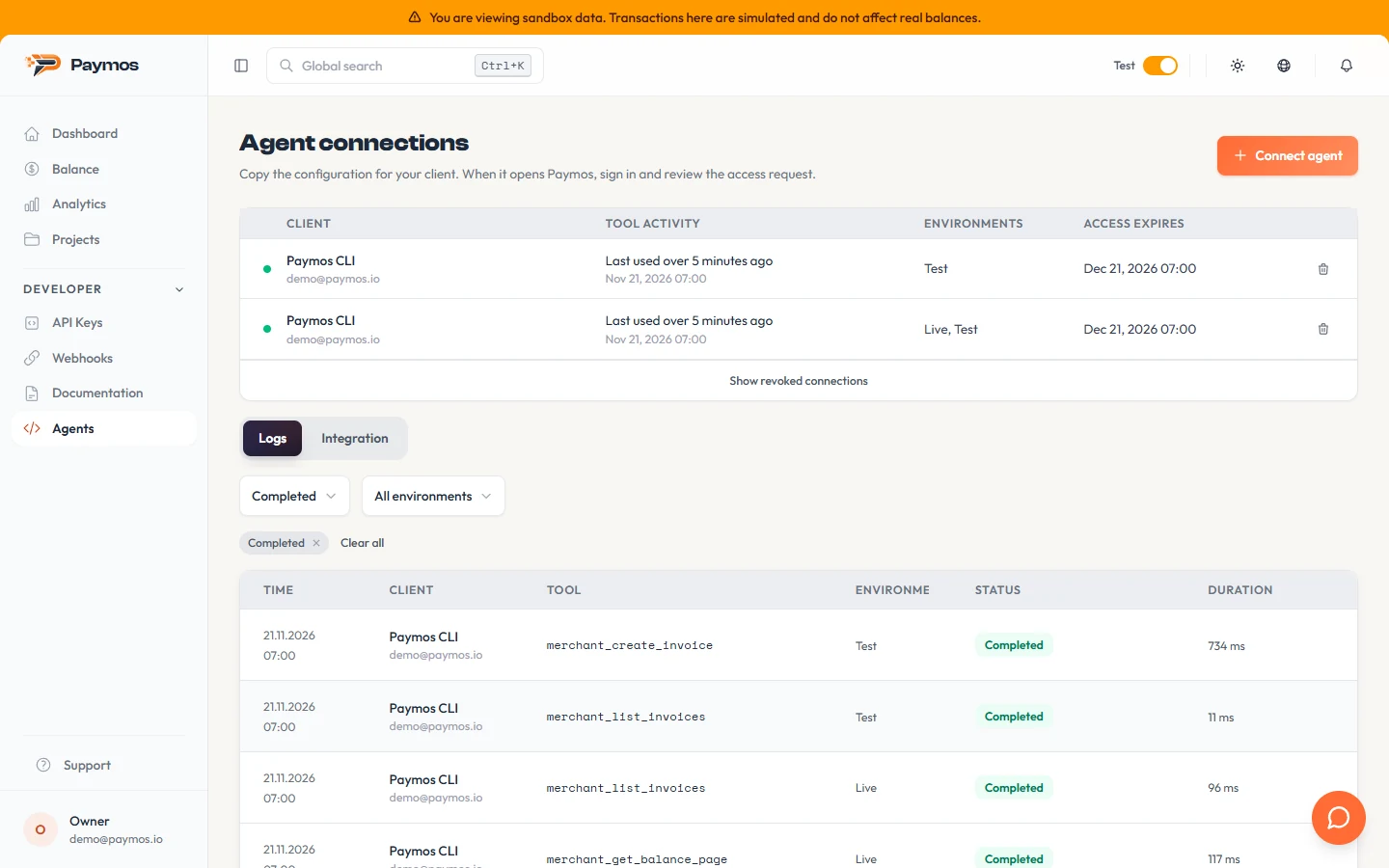
Paymos dashboard Developer Agents page showing active Paymos CLI OAuth connections with Test and Live environment scopes, expiry dates, disconnect controls, and a filterable Logs table of merchant_create_invoice, merchant_list_invoices, and merchant_get_balance_page calls.

How it works

Install once, sign in via browser, and start prompting

Start offline with Paymos docs and integration guidance, then authorize your merchant workspace in the browser without issuing a separate agent key.

  1. 1

    Install the plugin or run the CLI wizard

    Add Paymos straight from Paymos-labs/mcp in Claude Code, Codex, Antigravity, Gemini CLI, or Copilot CLI with no Node.js needed. On other local editors with Node.js 22.12+, run npx -y @paymos/mcp setup — your existing MCP servers and comments stay intact.

  2. 2

    Approve Test or Live access in your browser

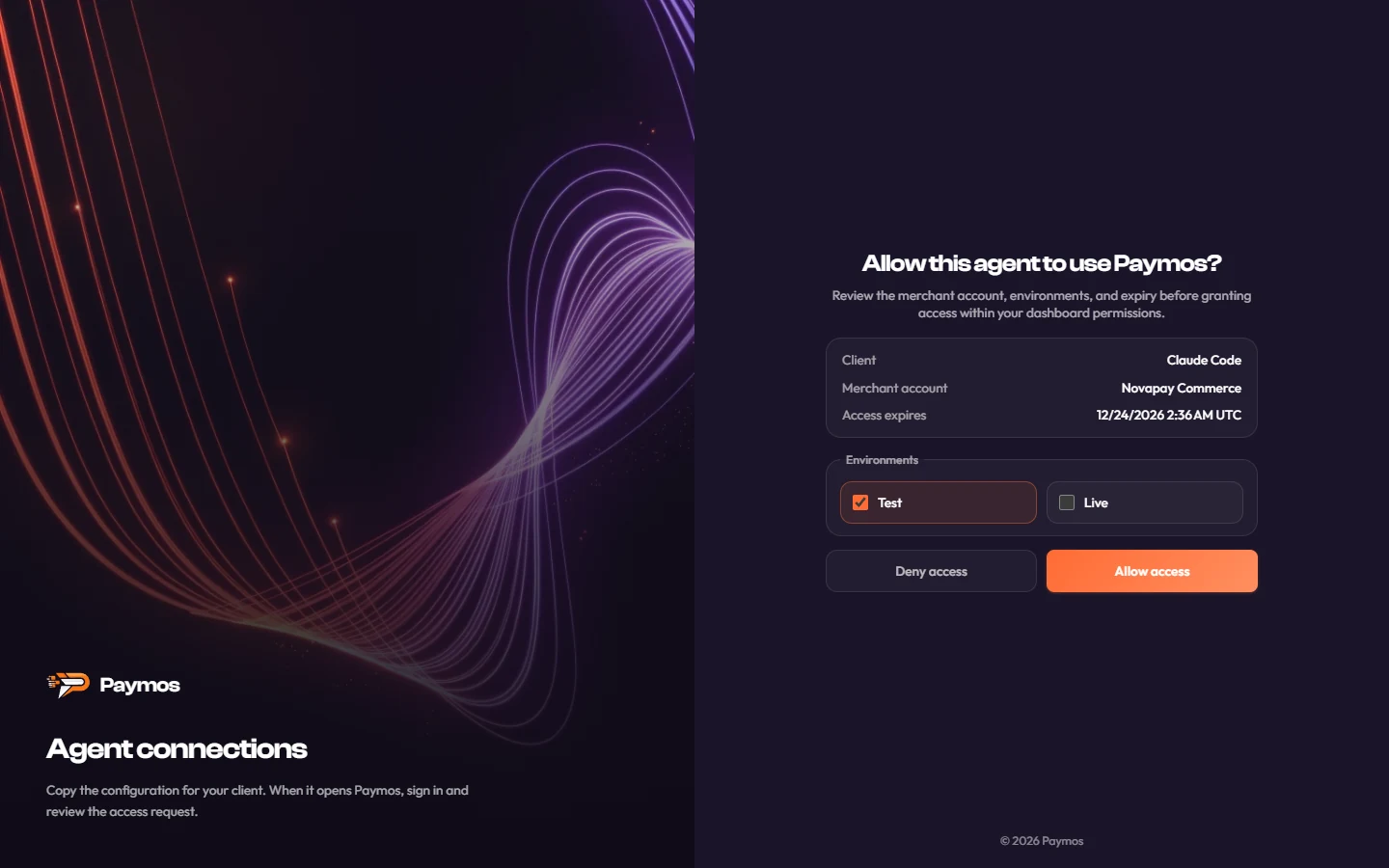
    Your browser opens the Paymos OAuth 2.1 (PKCE S256) consent screen. Tick Test (Sandbox), Live (Production), or both — the session inherits your existing dashboard team role with no API key to paste into your editor.

  3. 3

    Build, test in Sandbox, and audit every call

    Ask your agent to pick an SDK, simulate Sandbox payments, verify webhook signatures, or inspect live balances across 188 workspace tools. Review every tool call or disconnect any client in one click under Developer → Agents.

Works offline before login, runs full Sandbox after OAuth

Even before you sign in, recommend_payment_integration, verify_webhook_signature, paymos_auth_status, and 27 compiled paymos://docs/* pages run locally with zero network calls. Once connected, the paymos-sandbox skill simulates paid, paid_late, overpaid, underpay, and cancel invoices, channel deposits, refunds, and withdrawal completions without touching Live.

Paymos OAuth 2.1 consent screen titled Allow this agent to use Paymos? showing the client name, merchant account, expiry date, separate Test and Live environment checkboxes, and Deny access or Allow access buttons.

What you can ask

Real tasks your coding agent handles end to end

Instead of copying docs between browser tabs, give your editor plain instructions and let it check schemas, test Sandbox flows, and inspect your account directly.

Integration

Add stablecoin checkout to your app from scratch

Check which Paymos SDK fits our Node.js backend, scaffold hosted checkout for USDT and USDC, and verify our raw-body webhook handler.

The agent calls recommend_payment_integration, reads the current paymos://docs/* specs, writes @paymos/sdk checkout and HMAC webhook code, and checks X-Webhook-Signature locally with verify_webhook_signature.
Sandbox testing

Simulate every payment and webhook edge case

Create a $49 Sandbox invoice, simulate an overpayment and a late payment on a second invoice, then inspect webhook deliveries for both.

Using the paymos-sandbox skill, the agent creates test invoices, triggers paid, overpaid, underpay, paid_late, or cancel states, and reads delivery logs so you verify order fulfillment before touching Live.

Operations

Audit balances, replay webhooks, and prepare payouts

Show our available USDT balance, list failed webhook deliveries from today, and prepare a withdrawal to our whitelisted treasury wallet.

The agent reads live balances and replays missed webhooks within your dashboard role. Payouts target whitelisted addresses only and pause with a continue_url for browser TOTP or passkey confirmation when 2FA is active.

Supported AI clients

Native GitHub plugins and local CLI setup across your editors

Install straight from GitHub where native plugin marketplaces exist, or let npx -y @paymos/mcp setup configure your local editors automatically.

Claude Code

Add Paymos-labs/mcp and install paymos@paymos from the terminal or inside /plugin. Connects directly over remote Streamable HTTP with all four Paymos skills and rules/AGENTS.md included — no Node.js needed.

OpenAI Codex

Run codex plugin marketplace add Paymos-labs/mcp and select Paymos inside /plugins, or write ~/.codex/config.toml with @paymos/mcp setup. Browser OAuth 2.1 signs your workspace in with no static key.

Cursor

Write ~/.cursor/mcp.json with npx -y @paymos/mcp setup --client cursor and add the four Paymos skills via npx skills add Paymos-labs/mcp. The repository also ships .cursor-plugin/plugin.json and rules/paymos.mdc.

Antigravity and Gemini CLI

Install with agy plugin install for Antigravity or gemini extensions install for Gemini CLI. Both connect straight to the remote Merchant MCP server and load the bundled Paymos skills.

GitHub Copilot CLI and VS Code

Install the native plugin with copilot plugin marketplace add Paymos-labs/mcp, or configure workspace .vscode/mcp.json through npx -y @paymos/mcp setup --client vscode.

Agent Skills and other CLI editors

Load all four Paymos skills into 30+ AI tools via npx skills add Paymos-labs/mcp, and pair them with npx -y @paymos/mcp setup for Claude Desktop, Windsurf, Kimi CLI, ZCode, OpenCode, or manual context_servers in Zed.

Quick install

Copy one command for your editor

Pick your client below to install a native GitHub plugin or configure the local stdio bridge.

Read docs
claude plugin marketplace add Paymos-labs/mcp && claude plugin install paymos@paymos
# Interactive session: /plugin marketplace add Paymos-labs/mcp, then /plugin install paymos@paymos
codex plugin marketplace add Paymos-labs/mcp
# Then open /plugins and select Paymos
agy plugin install https://github.com/Paymos-labs/mcp.git
gemini extensions install https://github.com/Paymos-labs/mcp
copilot plugin marketplace add Paymos-labs/mcp && copilot plugin install paymos@paymos
npx -y @paymos/mcp setup --client cursor
npx skills add Paymos-labs/mcp
# Paymos-labs/mcp also ships .cursor-plugin/plugin.json, mcp.json, rules/paymos.mdc, and skills/
npx skills add Paymos-labs/mcp
# Installs 4 Paymos skills into 30+ AI tools; pair with npx -y @paymos/mcp setup for MCP tools

Native plugins vs. local CLI setup

GitHub plugins connect straight to https://app.paymos.io/connect/merchant-mcp with no local Node.js required. On machines with Node.js 22.12+, npx -y @paymos/mcp setup writes @paymos/mcp connect next to existing servers without touching your model endpoints.

Optional key-based Sandbox server

Need a narrower 15-tool, 5-doc local Sandbox server without OAuth? Run npx -y @paymos/mcp setup --sandbox with a test Payment key pair (pk_test_ and sk_test_). Live keys and rk_ payout keys are always rejected.

Two ways to run

Useful offline before login, connected to your account after OAuth

Use local docs and webhook verification without signing in. Authorize OAuth only when you want Sandbox simulations or account actions.

Before login · Offline

Local docs, advisor, and webhook checks

Zero network requests, zero browser popups, and zero Paymos credentials required.

  • 27 compiled paymos://docs/* guides — 15 core API and checkout pages plus 12 official CMS plugin guides.
  • recommend_payment_integration compares 8 server SDKs, 12 CMS plugins, Hosted Checkout, Low-Code widget, POS, and Payment Channels.
  • verify_webhook_signature checks raw-body X-Webhook-Signature headers locally, including dual-v1= rotation windows, while paymos_auth_status reports local login state.
After OAuth 2.1 · Connected

188 Sandbox and merchant workspace tools

Scoped strictly to your team role and the Test or Live boxes you ticked in the browser.

  • Create projects, configure accepted assets across 4 stablecoins (USDT, USDC, USD1, DAI) and gold-backed XAUT, and manage widgets or POS links.
  • Run full Sandbox simulations for invoices, 24h-cursor payment-channel deposits, refunds, and withdrawals before shipping production code.
  • Inspect live balances, replay webhooks, rotate keys into .env via otk_* tickets, and trigger 2FA-confirmed withdrawals to whitelisted wallets.

Live API contracts

Current schemas and guardrails inside every prompt

Your editor reads current Paymos endpoints, webhook rules, and asset limits straight from the server instead of guessing from outdated training data.

191 tools, 27 docs pages, and 4 skills

Three offline tools and 188 OAuth tools cover checkout, invoices, payment channels, refunds, webhooks, and balances. Four bundled skills — paymos-integrate, paymos-webhooks, paymos-sandbox, and paymos-workspace — keep generated code on contract.

No API keys pasted into editor configs

Native plugins connect to https://app.paymos.io/connect/merchant-mcp over OAuth 2.1 (PKCE S256 and dynamic client registration). You approve Test, Live, or both in your browser instead of storing static merchant keys inside IDE config files.

Complete Sandbox lifecycle simulations

Trigger paid, paid_late, overpaid, underpay, and cancel states on test invoices, simulate confirming, reorged, and confirmed channel deposits, and verify refunds or payout completions without moving real funds.

API and webhook secrets go straight to .env

When an agent creates or rotates Payment, Payout, or webhook secrets, @paymos/mcp redeems a single-use otk_* ticket via install-secret on your machine. Raw sk_ and whsec_ values land in .env and never enter the AI chat transcript.

Safety controls

Clear guardrails around your money and secrets

Merchant MCP inherits your dashboard permissions, blocks adding new payout addresses through the agent, and keeps sensitive Live actions behind browser confirmation.

Your dashboard role and one-click disconnect

Each OAuth 2.1 session inherits your Paymos team role — Owner, Admin, Finance, Developer, or Custom — and only the Test or Live environments you checked. Disconnect any agent in one click under Developer → Agents without disturbing your store's pk_ or rk_ keys.

Agents cannot add withdrawal addresses

The server blocks adding or restoring withdrawal whitelist addresses over MCP, and agents cannot turn whitelist protection off — disabling it requires the Owner via Paymos support with operator approval. By default, permitted roles withdraw only to addresses already whitelisted in your dashboard.

Browser 2FA confirmation and ticket-based handoffs

When TOTP or a passkey is enrolled, sensitive Live actions — withdrawals, secret rotations, and team changes — pause and return a continue_url for browser confirmation. Secrets and files move via one-time otk_* and ftk_* tickets outside model chat.

Merchant automation, not an x402 buyer wallet

Paymos MCP automates integration, Sandbox QA, and merchant account tasks — it is not an autonomous buyer wallet and does not execute x402 pay-per-request spending. Your production app still talks to the Merchant API through one of the eight official server SDKs.

Inside the dashboard

Control every connected agent from one screen

Client install snippets, OAuth scope approvals, and tool execution logs live under Developer → Agents.

Tabbed setup docs inside Developer → Agents

Switch between native GitHub plugin commands, the @paymos/mcp CLI wizard, and the remote Streamable HTTP URL inside the Integration tab.

Explicit Test and Live OAuth consent

Inspect the client name and token expiry, then check Test only or both Test and Live before granting access.

Filterable tool call logs

Filter agent activity by status and environment to see which client invoked each merchant_* tool, where it ran, and how long it took.

Common questions

What developers ask before connecting an agent

Direct answers on credentials, withdrawal limits, Node.js requirements, .env delivery, and pricing.

Do I need to add API keys to my AI editor?

No. The default GitHub plugins and npx -y @paymos/mcp setup flow use browser OAuth 2.1 (PKCE S256) with zero upfront API keys. Your session inherits your dashboard team role and only the Test or Live scopes you approve. Static test Payment keys (pk_test_ and sk_test_) are needed only if you choose the narrower key-based --sandbox mode.

Can an AI agent withdraw funds to an unknown address?

No. Withdrawal address whitelists are active by default and managed strictly in the Paymos dashboard — MCP blocks adding or restoring whitelist addresses on the server, and turning whitelist protection off requires the account Owner through Paymos support with operator approval. Withdrawals also require a permitted role (Owner, Finance, or a Custom role with withdrawal permission) and pause for browser TOTP or passkey confirmation when 2FA is active.

Which AI clients work, and do I need Node.js?

Claude Code, OpenAI Codex, Antigravity, Gemini CLI, and GitHub Copilot CLI install as native GitHub plugins from Paymos-labs/mcp and connect straight to https://app.paymos.io/connect/merchant-mcp with no Node.js required. Cursor, Claude Desktop, Windsurf, VS Code, Kimi CLI, ZCode, OpenCode, and generic configs use npx -y @paymos/mcp setup, which requires Node.js 22.12+. Zed connects via a manual context_servers entry, and npx skills add Paymos-labs/mcp adds the four skills to 30+ AI tools.

How do API and webhook secrets land in .env without entering chat?

Before creating or rotating a Payment key, Payout key, or webhook secret, run npx -y @paymos/mcp install-secret --prepare locally and pass the generated request_id and challenge to the MCP tool. Paymos returns a single-use otk_* installer ticket instead of the raw secret; redeeming that ticket on the same machine writes sk_ or whsec_ straight to .env so the secret never appears in the model chat transcript.

How do I disconnect an agent, and does MCP cost extra?

Open Dashboard → Developer → Agents and click Disconnect to revoke an agent session immediately without affecting your store's pk_ or rk_ API keys. Both @paymos/mcp and the Paymos GitHub plugins are free with no subscription or per-tool fee — standard incoming payment processing stays 1.0% (0.3% Enterprise on request), with 0% Paymos commission on withdrawals.

Pricing

Free MCP server and plugins. 1.0% on settled payments

No subscription or per-tool fee for @paymos/mcp or the GitHub plugins. Incoming payments settle at 1.0% (Enterprise 0.3% on request) across 4 stablecoins (USDT, USDC, USD1, DAI) plus gold-backed XAUT on 13 deposit networks, and Paymos takes 0% withdrawal commission across 11 payout networks (subsidized network fee only; NEAR and Sui are deposit-only).

See pricing

Connect your coding agent to Paymos