Install n8n-nodes-paymos from Community Nodes
Installing n8n-nodes-paymos from npm adds both the Paymos action node and Paymos Trigger in one package.
n8n Integration
Install the official n8n-nodes-paymos community package on n8n Cloud or Self-Hosted. Issue invoices, verify 18 signed webhook events, create server-calculated refunds, or wire Paymos Tool directly into an n8n AI Agent.
How it works
Install the community package, save your Payment API credentials, and test the entire chain in Sandbox before switching to Live.
Open Settings → Community Nodes in n8n Cloud or Self-Hosted and install n8n-nodes-paymos from npm, or run npm install n8n-nodes-paymos in custom Self-Hosted container builds.
Create a Paymos API credential in n8n and enter your Payment Public Key (pk_test_ or pk_live_), Secret Key (sk_), and optional Webhook Signing Secret (whsec_) for triggers. Save to run the built-in HMAC-SHA256 connection test.
Create invoices and payment channels, trigger fulfilment from verified webhooks, or attach Paymos Tool to an n8n AI Agent. Verify the full flow with Sandbox simulation operations before switching to Live credentials.
Official community node
Two nodes — Paymos and Paymos Trigger — plus one Paymos API credential type covering 4 resources and 18 operations.

n8n-nodes-paymos ships with zero external runtime packages, signs requests straight to https://api.paymos.io, and runs identically on n8n Cloud and Self-Hosted instances.
Every call signs Authorization: HMAC-SHA256 with X-Request-Timestamp, and Credential Test checks GET /v1/invoices?limit=1 on Save. Paymos Trigger verifies X-Webhook-Signature over rawBody with timingSafeEqual, dual-v1= rotation windows, and a 300 s timestamp check.
Because the Paymos node declares usableAsTool: true, n8n exposes Paymos Tool for AI Agent workflows. Agents can generate checkout links, inspect payment status, open channels, and submit invoice refunds — on Self-Hosted, set N8N_COMMUNITY_PACKAGES_ALLOW_TOOL_USAGE=true.
The node enforces Payment-only scope and rejects rk_ payout credentials outright so automation flows cannot withdraw funds to arbitrary addresses. Paymos Trigger can still listen to all 6 withdrawal.* events for accounting and alerts.
Install and configure
Install from Community Nodes or npm, enable tool usage on Self-Hosted instances, and keep Sandbox and Production credentials separate.
Read docs# Self-Hosted n8n (or open Settings -> Community Nodes -> install n8n-nodes-paymos)
npm install n8n-nodes-paymos
# Enable Paymos as an AI Agent tool on Self-Hosted n8n
N8N_COMMUNITY_PACKAGES_ALLOW_TOOL_USAGE=true{
"credentialType": "paymosApi",
"publicKey": "pk_test_xxxxxxxxxxxx",
"secretKey": "sk_test_xxxxxxxxxxxx",
"webhookSecret": "whsec_test_xxxxxxxxxxxx",
"baseUrl": "https://api.paymos.io"
}Verified community nodes attach to AI Agent tools on n8n Cloud without extra flags. On Self-Hosted Docker or Node deployments, add N8N_COMMUNITY_PACKAGES_ALLOW_TOOL_USAGE=true and point N8N_WEBHOOK_URL to public HTTPS.
Keep https://api.paymos.io as the base URL for both environments — the node detects Sandbox or Production from pk_test_ or pk_live_. Calling any Simulate Sandbox operation with a pk_live_ credential is blocked before any HTTP call leaves n8n.
Live in n8n
Every step below was captured in a live n8n instance connected to Paymos Sandbox.
Installing n8n-nodes-paymos from npm adds both the Paymos action node and Paymos Trigger in one package.
Saving your Paymos API credential runs a signed GET /v1/invoices?limit=1 request and confirms Connection tested successfully.
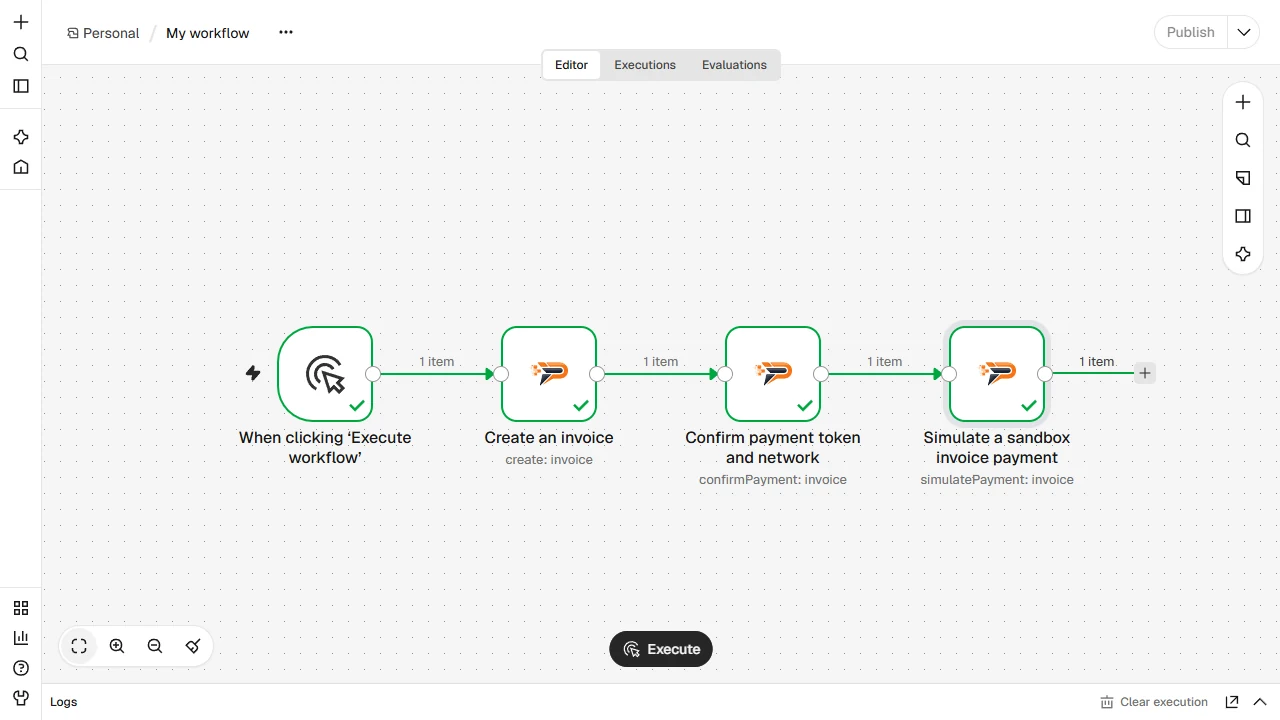
Chain Create an invoice, Confirm payment token and network, and Simulate a sandbox invoice payment to verify paid states with zero real transfers.
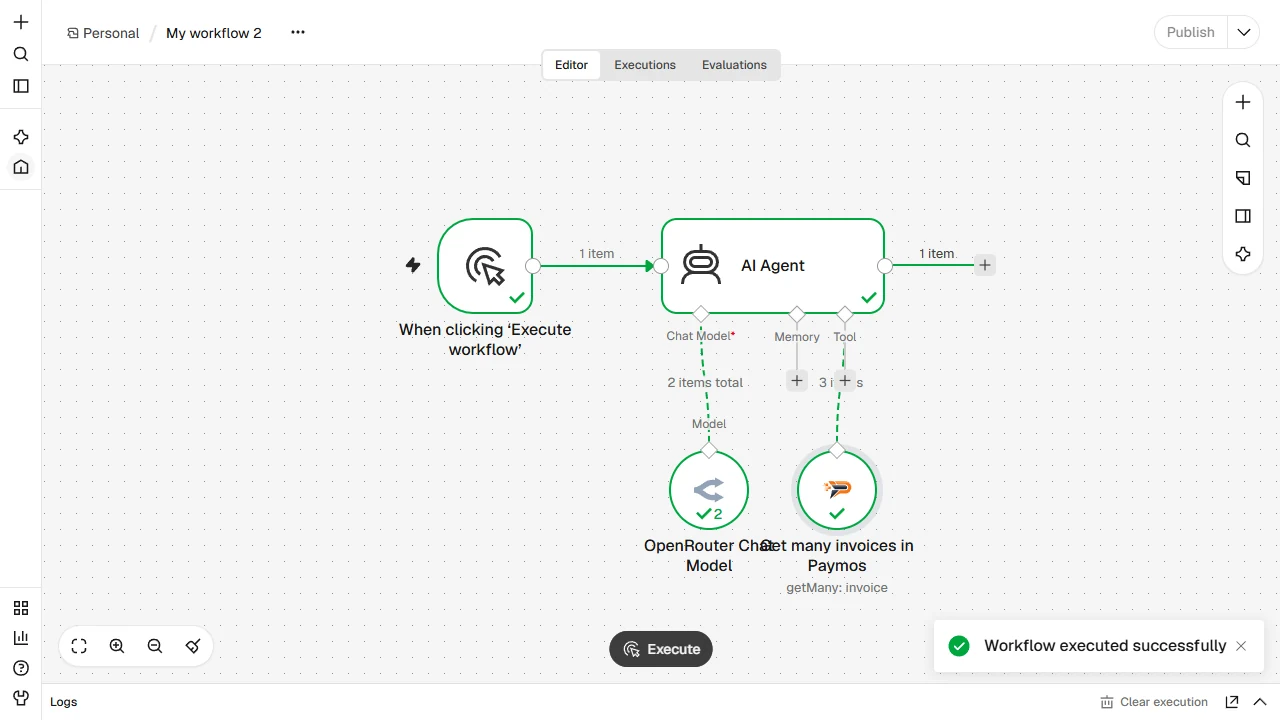
Connect Paymos to an AI Agent Tool port so the model can fetch recent invoices, verify paid statuses, and return structured summaries.
Workflow patterns
Connect Paymos to Telegram, CRMs, helpdesks, databases, and AI agents across 4 stablecoins (USDT, USDC, USD1, DAI) and gold-backed XAUT.
Let an n8n AI Agent create hosted checkout links with unique external_order_id values, verify payment status with Invoice: Get before unlocking access, and trigger server-calculated full or overpayment refunds.
Listen on Paymos Trigger for invoice.paid and invoice.paid_over, deduplicate by invoice_id and event_id, then grant Telegram or Discord roles, close CRM deals, and send receipts automatically.
Route all 18 canonical webhook events — 9 invoice, 3 payment-channel deposit, and 6 listen-only withdrawal events — into Postgres, Google Sheets, or Slack, or poll the 24-hour deposit feed while storing next_cursor.
Test invoices, channel deposits, and refunds with built-in Sandbox simulation actions on pk_test_ credentials. In Production, support flows issue refunds strictly to the invoice’s first confirmed sender while payout keys stay blocked.
Pricing
n8n-nodes-paymos is free to install on n8n Cloud and Self-Hosted with no extra automation surcharge. Settled payments carry the standard 1.0% fee (0.3% Enterprise on request), and withdrawals carry 0% Paymos commission across 11 payout networks (13 deposit networks; NEAR and Sui are deposit-only).
See pricing